
Auto Blur

Auto Blur

Blur faces, plates and private details in any photo

Auto Blur detects faces, licence plates, IBANs, card numbers, ID numbers, e-mail addresses and phone numbers in a photo or screenshot and blurs them in one tap. Detection runs on your device: nothing is uploaded, nothing is stored.
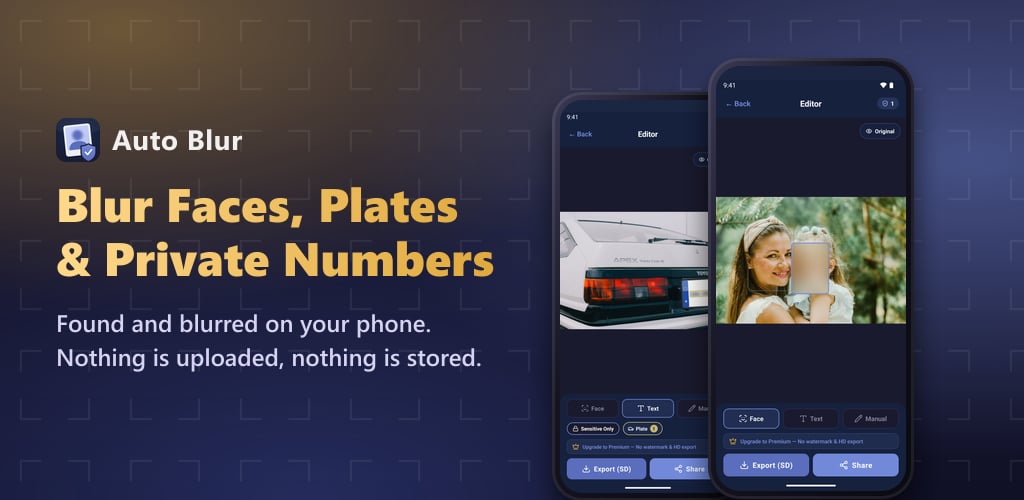
Auto Blur — Blur faces, plates and private details in any photo

What Auto Blur can hide

Sensitive details are found automatically, and you can still blur or unblur anything by hand.

Blur faces in photos

Every face in the picture is detected and covered with a smooth blur: children in a family photo, strangers in a crowd, students in a classroom, passers-by in a property listing. Tap a face to keep it visible.

Blur licence plates

Number plates are recognised and hidden in one step. Useful before you post a car for sale, share a dash-cam or accident photo, or upload anything shot in a car park.

Hide IBANs, card and ID numbers

Bank account numbers, IBANs, credit card numbers and national ID numbers in a receipt, statement or document photo are recognised and blurred, so you can share the image without exposing the account.

Hide phone numbers and e-mails

Phone numbers and e-mail addresses in a chat screenshot, a scanned page or a photographed sign are found and blurred, so contact details do not travel with the image. Numbers from every country are supported.

Sensitive only, or all text

Choose between covering just the risky parts and blurring every piece of text in the image when a whole document should be unreadable. Draw your own blur over anything else with a finger.

Save or share straight away

Keep the blurred copy in your gallery or send it to any messaging or social app. Open a photo from another app's share menu and get the safe version back in seconds. The original stays untouched.

When you need Auto Blur

A few everyday moments where a photo should not give away more than you intend.

Sharing photos of your kids

Post the moment, not your child's face. Blur the children in a photo before it goes to a group chat or social media.

Selling a car

Hide the licence plate in every listing photo so your vehicle cannot be traced or cloned.

Posting a screenshot

Blur phone numbers, e-mail addresses and names in a chat or app screenshot before you share it.

Sending a receipt or invoice

Cover the IBAN, card number or ID number on a document photo while keeping the rest readable.

Street, event and travel photos

Make strangers unrecognisable in crowd photos so you can publish them without asking everyone for consent.

Property, classroom and workplace photos

Blur faces of visitors, students or colleagues in photos used for listings, reports and presentations.

How it works

Three steps between a photo and a version that is safe to share.

Pick a photo

Choose any image from your gallery, or send one to Auto Blur from the share menu of any app. It is opened on your device and stays there.

Let it find the details

Faces, licence plates, IBANs, card and ID numbers, e-mails and phone numbers are detected on the spot, with no upload and no waiting.

Check, then save or share

Tap a box to blur or unblur it, draw extra blurs by hand, compare with the original, then save the result or share it directly.

Why Auto Blur

Made for people who want to share a photo without handing over what is in it.

Works offline

Everything runs on your device

No upload, no account

Photos never reach a server

Reliable detection

On-device face and text recognition

You stay in control

Decide what gets blurred

Frequently asked questions

What people ask us most often.

Are my photos uploaded to a server?
No. Face detection, text recognition and blurring all run on your device, so the photo never leaves it. There is no account and no cloud. That is also why the app keeps working with no internet connection.
Is Auto Blur free?
Yes. Detecting and blurring is free with no limit and no ads. An optional one-time Premium purchase removes the small watermark and exports at full resolution.
Can the blur be undone or reversed?
Not from the saved copy. The blur is baked into the exported image, so whoever receives it cannot recover what was underneath. Your original photo stays untouched in your gallery.
What if it misses something, or blurs too much?
Tap any detected box to switch it off, or draw a blur by hand over anything that was missed. A quick look at the result before sharing is always worth it, as with any automatic detection.
Which details does it detect?
Faces, licence plates, IBANs, credit card numbers, national ID numbers, e-mail addresses and phone numbers from any country. You can also blur all text in the image, or draw your own regions.
Does it work with screenshots and chat images?
Yes. Screenshots of chats, apps and documents are a typical use: numbers, e-mails and names are recognised as text and can be blurred before you share the image.
Can I blur a photo directly from another app?
Yes. Open the photo in any app, choose Share and pick Auto Blur. The blurred version is ready to send back in a few seconds.
Which devices does it run on?
Auto Blur is available for Android phones on Google Play and for iPhone on the App Store. It supports 74 languages.

Blur it before you send it

Download Auto Blur for free and take the faces, plates and numbers out of a photo in a couple of taps.

Get it onGoogle Play
Download on theApp Store