Seismo

Seismo

Earthquake alerts, in real time

Seismo sends an alert to your phone when an earthquake happens in a country you follow — starting from the magnitude you choose.

Free · No account required · Android, iOS and Huawei
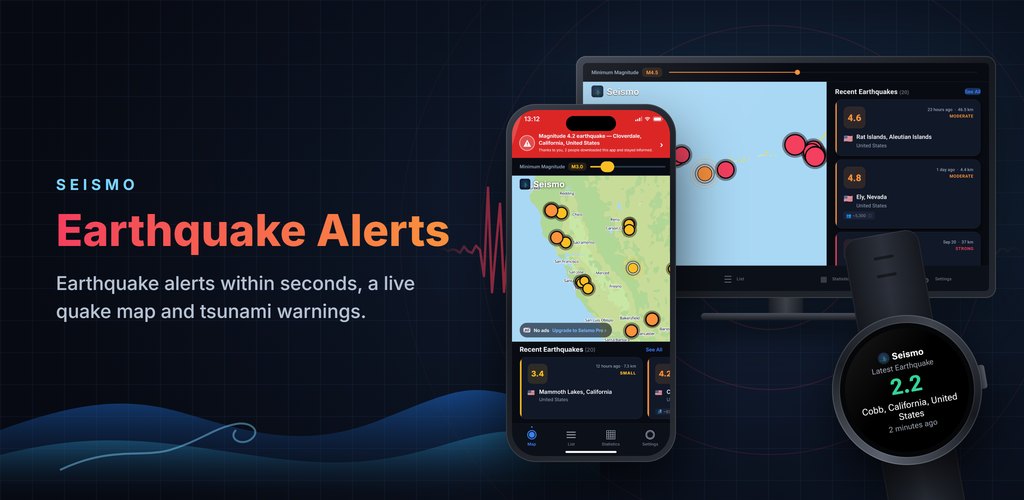
Seismo — Earthquake alerts, in real time

Recent Earthquakes

Earthquake Archive →

What Seismo does

Real-time earthquake data, filtered down to the events that actually concern you.

A threshold for your country

Pick the country you want to follow and set its own notification magnitude — M4.0 where you live, M6.0 somewhere you only visit. Seismo Pro lets you follow several countries.

Quiet hours with an override

Silence alerts overnight, but pick a magnitude that always gets through. A M3.2 will not wake you; a M6.5 will.

Live earthquake feed

Magnitude, depth, coordinates and local time at the epicentre for every event, updated continuously.

Interactive map

Epicentres plotted on a map you can pan and zoom, with circle size scaled to magnitude. Set a minimum magnitude right on the map and list to hide small tremors.

Country statistics

Earthquake counts, largest event, average magnitude and depth distribution for today, the last 7 days and the last 30 days in every country you follow.

74 languages

The whole interface — including country names and the text of the notifications themselves — in 74 languages.

Data from official agencies

Seismo combines reports from dozens of official seismological agencies — USGS and EMSC worldwide, plus national services such as AFAD and Kandilli, SGC, FUNVISIS, IGP, SSN, BMKG and JMA.

How many people felt it

For each earthquake Seismo shows an approximate number of people who may have felt it — on the map, in the list and on the detail page.

Your alert sound, your widget

Choose a short or long notification sound, and add the home-screen widget on Android or iOS to see the latest earthquake at a glance.

Alerts on your TV

On Android TV the earthquake alert appears over whatever you are watching, with sound. On Apple TV it appears full screen while Seismo is open. Open the details with your remote.

The latest quake on your watch

On Wear OS and Apple Watch, the watch app, tile and complication show the latest earthquake at a glance.

Your loved ones' countries

With Seismo Pro, follow several countries where family and friends live, each with its own magnitude threshold.

Setting it up takes about a minute

Three steps when you first open the app, and you are done.

Pick your countries

Choose at least one country or region to follow. You can add or remove them later in Settings.

Choose your magnitudes

Set the minimum magnitude for the list, then a notification magnitude for each country separately.

Allow notifications

Grant the notification permission when the system asks. Without it your filters are saved, but nothing can reach you.

Notification setup guide

Almost every “I'm not getting earthquake notifications” report comes down to one of these four things. Work through them in order.

1. At least one country has alerts switched on

Open Settings → Notifications. Following a country is not the same as enabling alerts for it: each country has its own alert toggle and its own notification magnitude. If every country is muted, no push will ever be sent.

2. Your notification magnitude is not set too high

If a country is set to M5.0, a M4.4 nearby will appear in the list but will not trigger a notification. For a country you live in, M4.0–4.5 is a sensible starting point; lower it if you want more.

3. The system notification permission is granted

Android 13+ and iOS both require an explicit permission. If you dismissed the prompt, the app shows a banner and keeps your settings — alerts start arriving the moment you allow notifications in system settings.

4. Quiet hours are not swallowing the alert

During quiet hours only earthquakes at or above your override magnitude get through. With quiet hours 23:00–07:00 and an override of M6.0, a M5.1 at 02:00 is silenced by design.

Still nothing? Use the built-in check

Settings has a “Not receiving notifications?” screen that tests push support, registration with the notification service, the system permission, the earthquake alerts channel, your followed regions, quiet hours and battery restrictions one by one, and tells you which one is failing. It can also send a test notification to your device straight away.

iPhone and iPad

  • A Focus or Sleep mode holds notifications back. Add Seismo to the allowed apps for that Focus.
  • If Seismo is in the Scheduled Summary, alerts are batched and delivered later. Remove it under Settings → Notifications.
  • Low Power Mode delays background delivery. Alerts still arrive, but not necessarily immediately.

Android

  • Battery optimisation can stop the app being woken in the background. Exempt Seismo in the battery settings — the in-app check has a shortcut for this.
  • The “Earthquake alerts” notification channel can be switched off separately from the app's notifications. Check it in system settings.
  • A device without Google Play Services cannot receive push at all. On Huawei devices Seismo uses Huawei's push service instead; on other devices without either, the map and list still work.

What each magnitude actually feels like

Seismo labels every earthquake on the same scale it uses in the app. Use it to decide where to set your alert threshold.

Magnitude Label in the app What people typically notice
< 2.0 Micro Not felt. Recorded by instruments only.
2.0 – 2.9 Minor Rarely felt, and only by people at rest indoors.
3.0 – 3.9 Small Often felt indoors, like a lorry passing. No damage.
4.0 – 4.9 Moderate Felt clearly by most people nearby. Windows and dishes rattle; damage is unlikely.
5.0 – 5.9 Strong Felt by everyone in the area. Poorly built structures can be damaged.
6.0 – 6.9 Very Strong Destructive up to roughly a hundred kilometres away in populated areas.
7.0 – 7.9 Major Serious damage over a wide area.
8.0 + Great Severe destruction across hundreds of kilometres.

How strongly an earthquake is felt also depends on depth, distance and ground conditions: a shallow M4.5 a few kilometres away can feel stronger than a deep M5.5 hundreds of kilometres away. Seismo shows the depth for every event.

Earthquake terms, explained

The words you see in the app and in the news — and what they actually mean.

Magnitude vs intensity
Magnitude is one number for the whole earthquake: how much energy the rupture released. Intensity describes how hard it shook at one particular place. A single earthquake therefore has one magnitude but many different intensities. Seismo shows magnitude.
Epicentre and hypocentre
The hypocentre is the point underground where the rupture begins. The epicentre is the spot on the surface directly above it — that is the location and place name Seismo shows for each event.
Depth
How far below the surface the rupture started. Seismo groups events as shallow (under 70 km), intermediate (70–300 km) and deep (over 300 km). At the same magnitude, a shallow earthquake is felt far more strongly.
Aftershock
A smaller earthquake that follows a larger one in the same area, sometimes for weeks afterwards. Aftershocks are normal and expected; Seismo points out when an event is an aftershock in a region you follow.
Tsunami warning
Issued when an undersea earthquake may have displaced enough water to send waves towards a coast. It means move away from the shore now, not wait and see. Seismo marks these events with a tsunami badge.
Damage estimate
A colour-coded assessment of the likely consequences, from green (no damage expected) through yellow and orange to red (severe destruction and casualties likely). It weighs magnitude and depth against how many people live nearby.

Frequently asked questions

The questions we are asked by email most often.

Why am I not receiving earthquake notifications?
In nearly every case it is one of four things: no country has its alert toggle switched on, the notification magnitude for that country is higher than the earthquake that occurred, the system notification permission was never granted, or quiet hours silenced the alert. Settings has a built-in “Not receiving notifications?” check that tests each of these — plus battery restrictions on Android — and can send a test notification. The setup guide above walks through the same steps.
From what magnitude is an earthquake felt?
Below about M2.5 an earthquake is normally only recorded by instruments. From M3.0 people indoors often notice it, from M4.0 most people nearby feel it clearly, and damage generally becomes possible from M5.0 upwards in poorly built structures. Depth and distance matter as much as magnitude: a shallow M4.5 a few kilometres away can feel stronger than a deep M5.5 hundreds of kilometres away.
What minimum magnitude should I set for alerts?
For a country you live in, M4.0–4.5 keeps you informed without constant interruptions. In a highly active region such as Japan, Indonesia, Chile or Türkiye you may prefer M4.5–5.0. For countries you follow out of interest, M5.5 or M6.0 is usually enough. You can set a different value for every country and change it at any time.
How quickly do alerts arrive?
Alerts normally reach you within a couple of minutes of the earthquake being published. Seismo is not an early-warning system: it reports earthquakes that have already happened and been measured, it does not warn you before the shaking reaches you.
Why did the magnitude of an earthquake change after I saw it?
The magnitude first reported for an earthquake is provisional. It is refined as more measurements come in, so it can shift by a few tenths in the hours afterwards. Seismo always shows the latest value. This is normal.
Can Seismo predict earthquakes?
No, and neither can anyone else. Predicting an earthquake — naming a place, a time and a magnitude in advance — is not scientifically possible today, and any app that claims otherwise is misleading you. Seismo reports earthquakes that have already happened, and points out when an event is an aftershock in a region you follow.
Does Seismo track my location?
No. Seismo never asks for location permission and does not use GPS. It works from the countries you pick yourself. Those choices are stored against an anonymous device ID on the server, because that is what the notifications are matched against — there is no account, no email address and no name.
How do I get Seismo on my Wear OS smartwatch?
Install Seismo from Google Play on your watch, or start the install from Google Play on your phone. The watch app is not standalone: it needs the Seismo app on your paired Android phone and shows the latest earthquake from the countries you follow there — add the Seismo tile from your watch's tiles to see it at a glance. Earthquake notifications from your phone are normally shown on the paired watch by the system, as with any Android app.
Does Seismo work on Apple Watch?
Yes, on watchOS 10 or later. The Seismo watch app comes with the iPhone app — install it from the Watch app on your iPhone. It shows the latest earthquake from the countries you follow, sent from your iPhone, and you can add Seismo as a complication to your watch face.
How do I get earthquake alerts on my Android TV?
Install Seismo on your Android TV and allow it to display over other apps. Alerts then appear on screen as a card with sound, even while you watch something else, and you can open the details with your remote. The “Allow” button in the app's Settings opens the right permission screen; you can usually also find it under Settings → Apps → Special app access → Display over other apps → Seismo, though menu names vary by TV maker.
Can I get earthquake alerts for several countries, such as where my family lives?
Yes, with Seismo Pro. The free version follows one country; Seismo Pro lets you follow several countries — for example where family and friends live — and set a separate notification magnitude for each.
Does Seismo work on Apple TV?
Yes. Install Seismo from the App Store on your Apple TV to see the map, the earthquake list and statistics on the big screen. While the app is open, you get an alert with sound on screen when an earthquake occurs in a country you follow.
How can I get the latest earthquake alerts?
Install Seismo and choose the country you live in: when an earthquake above the magnitude you set happens there, you are alerted, usually within a couple of minutes of the earthquake being published by seismic agencies. The list and map in the app show the latest earthquakes around the world with magnitude, location, depth and time, and the Recent Earthquakes list on this page shows the latest large earthquakes worldwide.
Was that an earthquake just now? Where can I check?
If you felt shaking, open the list in Seismo: once the earthquake has been measured and published it appears at the top with its location, magnitude and depth. You can see where it was on the map and tap it for details. A very recent earthquake can take a few minutes to appear.
Where was there an earthquake today?
The list in Seismo shows today's and recent earthquakes from newest to oldest; the map shows them all at once, and raising the minimum magnitude leaves only the larger ones. For older large earthquakes, see the Earthquake Archive on this page.
What is the difference between earthquake magnitude and intensity?
Magnitude measures the energy released at the source and is a single number for each earthquake; most agencies today use moment magnitude (Mw), while the older Richter scale (ML) is mainly used for nearby, smaller earthquakes. Each whole step in magnitude means about 32 times more energy. Intensity describes how strongly the shaking was felt at a particular place and what it did (Mercalli scale, I–XII); it varies with distance from the epicentre and with the ground.
What is an aftershock and how long do aftershocks last?
Aftershocks are smaller earthquakes that follow a larger one in the same area. They are most frequent in the first hours and days and become rarer over time, but after a large earthquake they can continue for weeks, months or even years. Occasionally an aftershock is strong enough to cause damage. Seismo tells you when an earthquake in a region you follow is an aftershock.
Why does earthquake depth matter?
Of two earthquakes with the same magnitude, the shallow one (less than about 70 km deep) is felt much more strongly at the surface and can cause more damage. In deep earthquakes the shaking weakens before it reaches the surface, but it can be felt over a wider area. Seismo shows the depth of every earthquake in kilometres.
How do I know if there is a tsunami warning?
Official tsunami warnings come from your country's tsunami warning centre and the authorities; follow them. Seismo shows large earthquakes at sea with a TSUNAMI label based on the source agency's flag; the label does not mean a tsunami has occurred and is not a substitute for an official warning. If you are on the coast and feel strong or long shaking, or see the sea suddenly pull back, move to high ground immediately without waiting for a warning.
What should I do during an earthquake?
When the shaking starts: Drop, Cover and Hold On — drop to the ground, take cover under a sturdy table protecting your head and neck, and hold on until the shaking stops. Stay away from windows and things that can fall; do not run outside while it is shaking and do not use lifts. If you are outdoors, move to an open area away from buildings, poles and power lines; if you are driving, stop in a safe place and stay inside. When the shaking stops, check for gas leaks and damage, and be ready for aftershocks.

How Seismo treats you

No account, no advertising profile, no invented numbers.

No location permission

The app never requests GPS or location access. You choose countries from a list instead.

No account, no email

Nothing to sign up for. Your device gets an anonymous identifier and that is all we hold.

No alert fatigue

Per-country thresholds and quiet hours mean you decide what is worth a buzz — not us.

Be prepared, not scared

Install Seismo and set your countries and magnitudes in about a minute.

Get it onGoogle PlayDownload on theApp StoreExplore it onAppGallery