What parents ask us most often about the baby monitor app.
Do I need to buy a baby camera?
No. Easy Baby Monitor turns two phones or tablets you already own into a video baby monitor: one becomes the baby cam in the nursery, the other the parent monitor. An old phone from the drawer works great as the camera.
Is the baby monitor app free?
Yes, you can use it for free with ads and free daily viewing time. Premium is an optional monthly subscription that removes ads, gives unlimited viewing and lets two parent phones watch at the same time.
Does it work between iPhone and Android?
Yes. Any phone or tablet can be the baby camera or the parent monitor: an Android tablet in the nursery and your iPhone, or the other way round.
Can I watch my baby when I'm away from home?
Yes. The baby monitor works over Wi-Fi and mobile data, so you can check on your baby from the next room, the garden or somewhere else entirely.
Will I be alerted if my baby cries?
Yes. You get cry and noise alerts with adjustable sensitivity, motion alerts, and warnings for a lost connection or a low battery on the baby phone, even when the app is closed.
Is my baby's video recorded or stored?
No. Video and sound are encrypted and sent directly between your own devices. Nothing is recorded or kept in the cloud.
What can I use the Easy Baby Monitor app for?
Mainly as a video baby monitor: watch your sleeping baby or your toddler's room from the kitchen, the living room, the garden or the office. Many families also use it as a pet camera, to check on an elderly relative, or as a travel baby monitor in a hotel or at the grandparents'.
Can I use my old phone as a baby camera?
Yes, that's exactly what it's made for. Any old Android phone (Android 7.0 or later) or iPhone (iOS 15 or later) lying in a drawer can become the baby cam. Just keep it on a charger in the nursery.
Can I use a tablet as a baby monitor?
Yes. A tablet works as the baby camera or as the parent monitor. Many parents like the big tablet screen to watch their baby, while an old phone stays in the nursery as the camera.
Can it replace a regular baby monitor?
Yes. You get live video and sound, cry and motion alerts, two-way talk and lullabies, like a video baby monitor. Unlike a radio baby monitor it has no range limit, because it works over the internet, and you don't need to buy any extra device.
Can I use it as a pet camera?
Yes. Leave a phone as the camera in the room with your dog or cat and watch them from anywhere. You can talk to them and get an alert when there is noise or movement.
Can I use it to check on an elderly relative?
Yes. With their consent, place a phone in their room as the camera and check on them from your own phone, with sound, two-way talk and noise and motion alerts.
Can I watch my baby from work while the babysitter is at home?
Yes. The parent monitor works over mobile data or any Wi-Fi, so you can check on your baby from work or anywhere else. The baby phone's screen shows that the baby camera is on, so let your babysitter or nanny know.
Can I use it when travelling, in a hotel or at the grandparents'?
Yes. It's a baby monitor that fits in your pocket: wherever both phones have internet, in a hotel, a holiday home or at the grandparents', you just open the app and you're ready.
Can I use two cameras for twins or two rooms?
Yes. You can add more than one baby camera and switch between them in your camera list. With Premium, up to 4 devices can be in your family, for example two baby cameras and two parent phones.
Which phones and tablets does it work with?
Android phones and tablets with Android 7.0 or later, and iPhone and iPad with iOS 15 or later. You can mix them freely, for example an Android tablet as the camera and an iPhone as the monitor.
How do I connect the two phones?
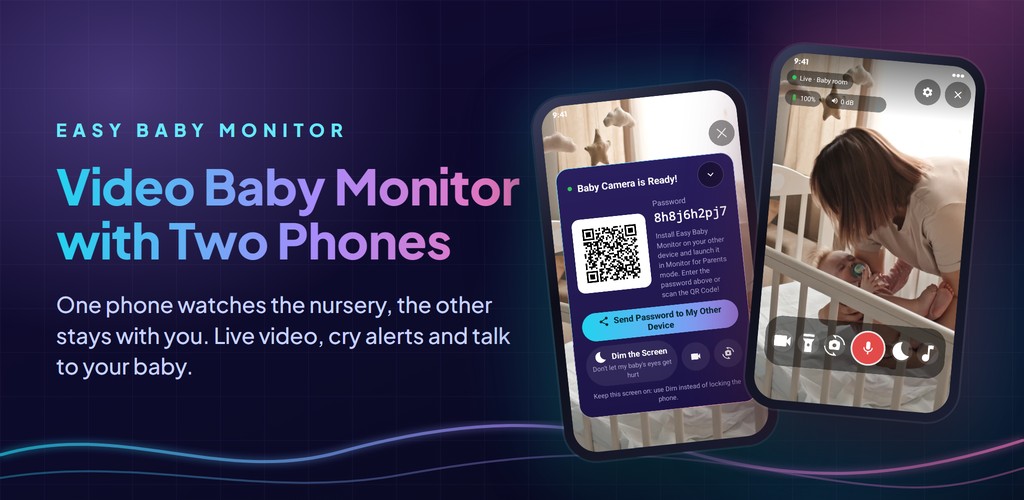
Open the app on the baby's phone and choose Camera for Baby Room: it shows a QR code and a password. On your own phone choose Monitor for Parents and scan the QR code or type the password. No account or sign-up is needed.
Do I need the internet or Wi-Fi?
Both phones need an internet connection, over Wi-Fi or mobile data. They don't have to be on the same Wi-Fi network, so you can watch your baby from anywhere.
Does the baby phone need to stay plugged in?
We recommend keeping it on a charger, because the camera stays on all night. Keep the app open and dim the screen instead of locking the phone. You get a warning when its battery is low.
Which languages is the app available in?
The app is available in more than 70 languages and opens in your phone's language automatically.
Can I see my baby in the dark?
The picture comes from the phone's own camera, which has no infrared night vision, so how well it sees in the dark depends on the phone. A soft night light in the room helps, and you can turn on the baby phone's flashlight from your own phone when you need to.
Can I talk to my baby?
Yes. Hold the talk button on your phone and your baby hears your voice from the baby phone, so you can soothe them without going into the room.
Can I play lullabies?
Yes. Choose a lullaby on your phone and it plays on the baby phone in the nursery. You can stop it or pick another one at any time.
Does it have motion detection?
Yes. The baby camera detects movement and you get a motion alert on your phone. You can adjust the sensitivity, and it works together with the cry and noise alerts.
Can I see the noise level in the baby's room?
Yes. The monitor shows the room's live sound level in decibels, so you can see if your baby is stirring even with your phone on silent. You get a cry alert when it gets loud.
Will the screen light bother my baby?
No. The baby phone can dim its screen while it keeps watching, so no light disturbs your baby's sleep. Night mode on your own phone darkens your screen too while you keep hearing your baby.
Can I zoom in or switch cameras?
Yes. Pinch to zoom in up to 4 times, and switch the baby phone between its front and back camera from your own phone. You can also turn the video off and keep only the sound, like an audio baby monitor.
Can both parents watch at the same time?
With the free version one parent phone can watch at a time. With Premium two parent phones can watch the baby at the same time, and up to 4 devices can be in your family.
Can someone else watch my baby camera?
Only a device that has your camera's password or QR code can connect, and video and sound go directly and encrypted between your devices. Keep the password private, and with Premium you can see and remove the devices in your family.
Can I watch the baby monitor on my TV?
Yes. Easy Baby Monitor works on Android TV, Google TV and Apple TV as the parent monitor. Keep a spare phone or tablet in the nursery as the baby camera and watch your baby full screen on the TV, with sound, lullabies, night mode and cry and motion alerts.
How do I connect my TV to the baby camera?
Open the app on the phone or tablet in the baby's room and choose Camera for Baby Room. On the TV, open Easy Baby Monitor and type the camera's password with the remote. The TV doesn't scan QR codes; the password is all you need.
Can my TV be the baby camera?
No. A TV can only be the parent monitor. The baby camera is always a phone or tablet in the baby's room.
Will I see alerts on my TV while I'm watching something else?
On Android TV and Google TV, yes: allow "Display over other apps" for Easy Baby Monitor, and cry, motion, connection and low-battery alerts pop up over whatever you are watching. On Apple TV, alerts appear while the Easy Baby Monitor app is open.
Can I talk to my baby from the TV?
On Android TV and Google TV, yes, if your TV has a microphone: hold OK on the talk button. The Apple TV app has no talk button; use your phone to talk to your baby.