Duplico
Duplico scans your gallery on your phone, groups exact copies and near-identical shots, and lets you delete the extras in a few taps.
For iPhone, iPad and Android · No account · Photos stay on your device
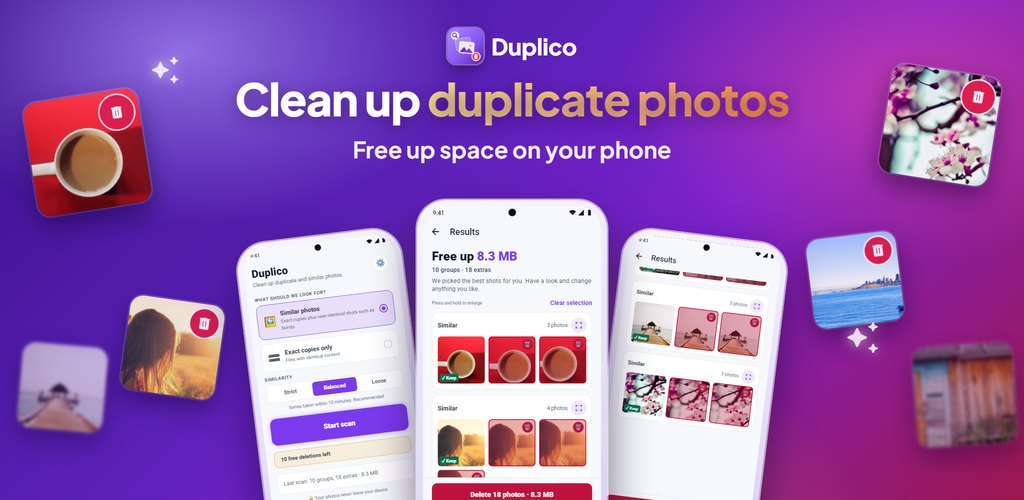
One job, done well: finding the photos you have more than once.
"Similar photos" finds exact copies plus near-identical shots such as bursts. "Exact copies only" finds files with identical content.
Each group suggests the best photo to keep — favorites first, then the highest resolution. You can change the choice with one tap.
Nothing is deleted without your confirmation in the system dialog. Deleted photos go to Recently Deleted on iPhone or to the trash on Android 11 and later, where you can restore them.
Scanning happens entirely on your phone. No photo, thumbnail or file name is ever uploaded.
Extra copies pile up quietly from everyday habits, and together they can take up a lot of space.
You take a few photos to get one good one, or hold the shutter for a burst. Usually only one is a keeper; the rest just take up space.
Saving the same image twice from a chat, an email or the web leaves identical copies in your gallery.
Duplicating a photo before editing it keeps both the original and the edited version side by side.
Importing from a computer, a camera or an old phone more than once can bring the same photos back again.
Clear rules, so you know exactly what you will see before anything is deleted.
Files with identical content. Duplico first compares size and dimensions, then confirms every match with a content fingerprint, so different photos are never grouped as exact copies.
Near-identical shots of the same moment taken one after another, such as bursts or several takes of the same scene. Duplico compares how the photos look and when they were taken. Screenshots and very dark or blank images are not grouped as similar.
Strict groups only near-identical shots taken within a minute. Balanced, the recommended level, groups series taken within 10 minutes. Loose groups similar shots taken within an hour.
In every group Duplico suggests the photo to keep: a favorite first, then the highest resolution, then the largest file, then the oldest. You can pick another one, and at least one photo always stays.
Scanning and reviewing results are always free. Your first 10 deletions are free. After that, each deletion is a one-time in-app purchase that deletes everything you selected in one go. No subscription, no ads.
Step-by-step help when your iPhone or Android storage is full.
When your iPhone says storage is full, new photos, updates and apps stop working. These steps free up space quickly, starting with the ones that usually help most.
When your Android phone or Samsung says storage is full, apps slow down and new photos cannot be saved. These steps free up space quickly.
You deleted photos, but the free space did not change. These are the usual reasons, and how to get the space back right away.
Duplicate and almost identical photos are one of the easiest ways to win back space on an iPhone without losing a moment.
Copies and near-identical shots pile up quickly on Android phones. This is how to find them and delete only the extras.
You do not have to lose your memories to get space back. These methods keep every photo.
Scanning is free and takes only a few taps. See how many duplicates are hiding in your photos.